

AgentCore Gateway now supports API GatewayAs organizations explore the possibilities of agentic applications, they continue to navigate challenges of using enterprise data as context in invocation requests to large language models (LLMs) in a manner that is secure and aligned with enterprise policies. To help standardize and secure those interactions, many organizations are using the Model Context Protocol (MCP) specification, which defines how agentic applications can securely connect to data sources and tools.
While MCP has been advantageous for net new use cases, organizations also navigate challenges with bringing their existing API estate into the agentic era. MCP can certainly wrap existing APIs, but it requires additional work, translating requests from MCP to RESTful APIs, making sure security is maintained through the entire request flow, and applying the standard observability required for production deployments.
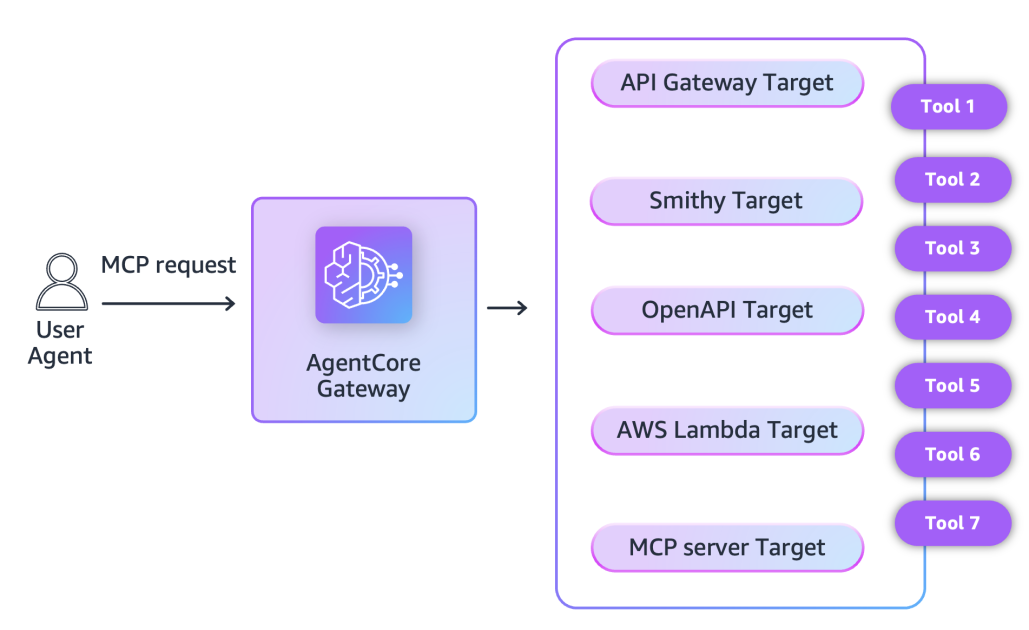
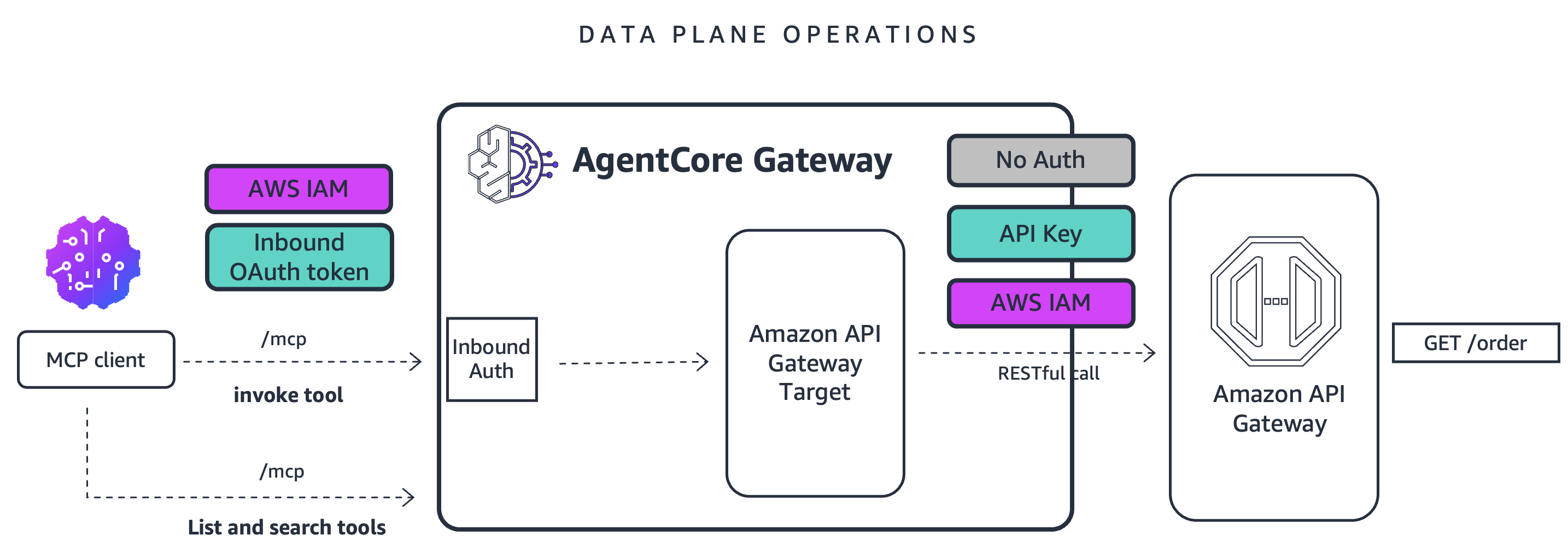
Amazon Bedrock AgentCore Gateway now supports Amazon API Gateway as a target, translating MCP requests to AgentCore Gateway into RESTful requests to API Gateway. You can now expose both new and existing API endpoints to agentic applications using MCP, with built-in security and observability. This post covers these new capabilities and shows how to implement them.
What’s new: API Gateway support in AgentCore Gateway
AgentCore Gateway now supports API Gateway targets in addition to existing target types (Lambda functions, OpenAPI schemas, Smithy models, and MCP servers).
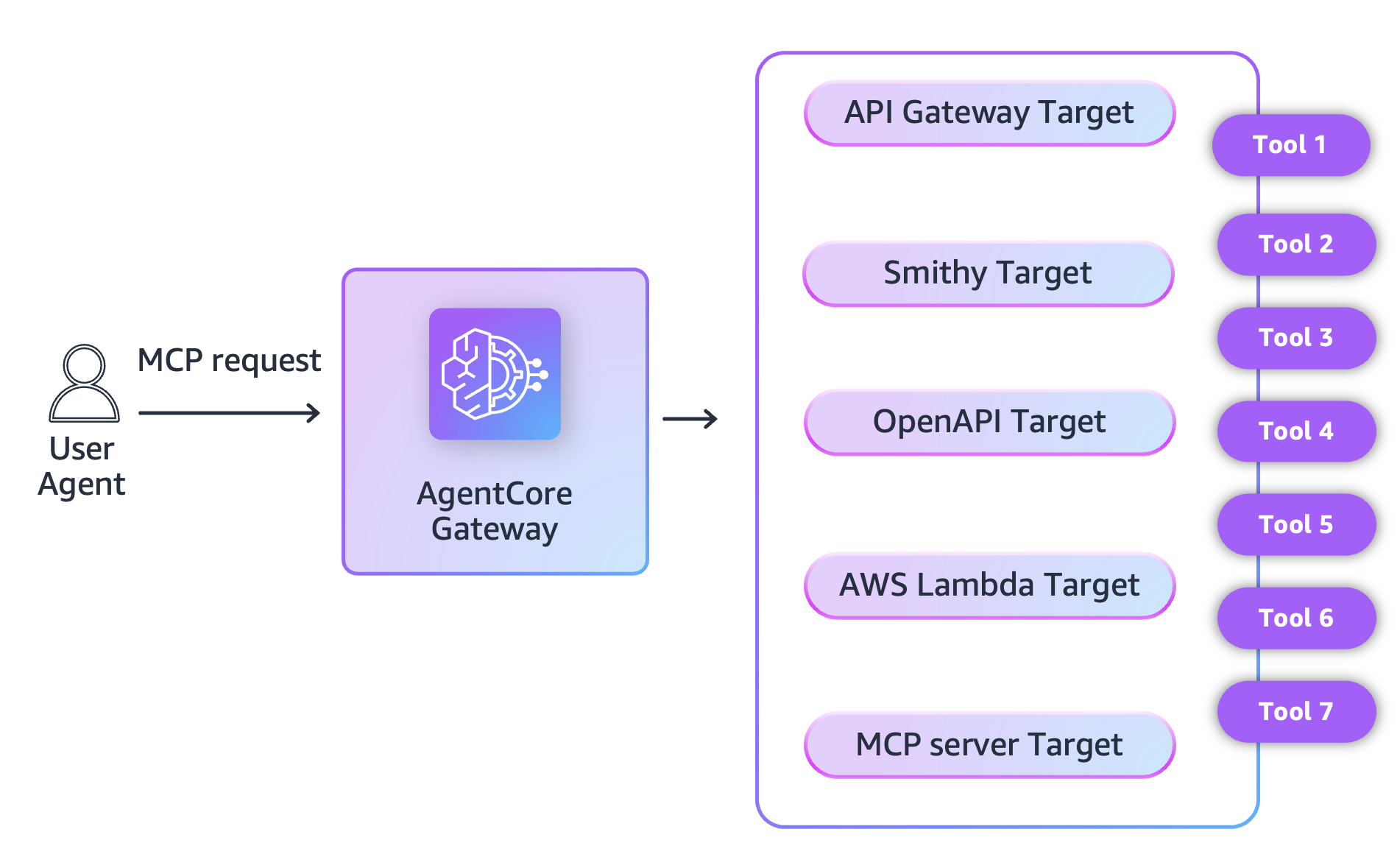
Our customers have successfully built extensive API ecosystems using API Gateway, connecting backends across numerous applications. As enterprises advance toward next-generation agentic applications, the natural evolution is to expose these existing APIs and backend tools to AI-powered systems, enabling seamless integration between established infrastructure and modern intelligent agents.
This integration between AgentCore Gateway and API Gateway simplifies the connection between API Gateway and AgentCore Gateway. It allows you to directly target API Gateway, so that you don’t need to export API Gateway APIs as an OpenAPI 3 specification and then add it to AgentCore Gateway as an OpenAPI target.
With this integration, a new API_GATEWAY target type will be added to AgentCore Gateway, eliminating the manual export/import process. REST API owners can add their API as an AgentCore Gateway target with a few console interactions or a single CLI command to expose their existing REST API as MCP tools using AgentCore Gateway. API consumers can then connect AI agents with these REST APIs through the Model Context Protocol (MCP) and power their workflows with AI integration. Your agentic applications can now connect to your new or existing API Gateway API. This integration between AgentCore Gateway and API Gateway supports IAM and API key authorization.
Both AgentCore Gateway and API Gateway have integrations with Amazon CloudWatch Logs, AWS CloudTrail, and AWS X-Ray for observability. Agent developers using this new capability between AgentCore Gateway and API Gateway can use these observability tools.
Walkthrough
This post shows you how to set up an existing REST API with API Gateway as a target for AgentCore Gateway. With this integration you can use your existing REST APIs as a tool for your agentic applications exposed using AgentCore Gateway.
Prerequisites
For this example, you need the following:
- An AWS account with an existing REST API in API Gateway.
- An Identity and Access Management (IAM) role or user with enough permissions to create an AgentCore Gateway and set up an API Gateway target.
You can create gateways and add targets in multiple ways:
This post uses Boto3 for setting up the integration between AgentCore Gateway and API Gateway. For an interactive walkthrough, you can use the Jupyter Notebook sample on GitHub.
Set up prerequisites for inbound and outbound authorization.
Inbound authorization authenticates incoming user requests. Outbound authorization helps AgentCore Gateway to securely connect to gateway targets, such as an API Gateway, on behalf of the authenticated user.
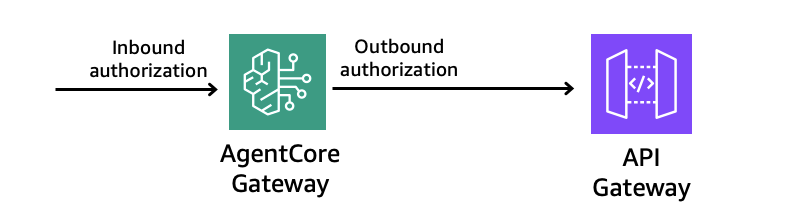
For API Gateway as a target, AgentCore Gateway supports the following types of outbound authorization:
- No authorization (not recommended) – Some target types provide you the option to bypass outbound authorization. We do not recommend this less secure option.
- IAM-based outbound authorization – Use the gateway service role to authorize access to the gateway target with AWS Signature Version 4 (Sig V4).
- API key – Use the API key, which is set up using AgentCore Identity to authorize access to API Gateway target. API keys created using an API Gateway mapped with API Gateway usage plans, helps you monitor and control API usage. Please refer to this documentation for more details.
Create an IAM role with the trust policy from the documentation.
- For Outbound Authorization with IAM-based authorization, the policy should include
execute-api:Invokepermission. Sample inline policy:
Once done, update the policy as described in the AgentCore Gateway documentation.
Create an AgentCore Gateway
When using the AgentCore starter toolkit, you can create a gateway with a default authorization configuration using Amazon Cognito for JWT-based inbound authorization.
This returns GATEWAY_ID that you will need to create the gateway target.
Create an AgentCore Gateway target
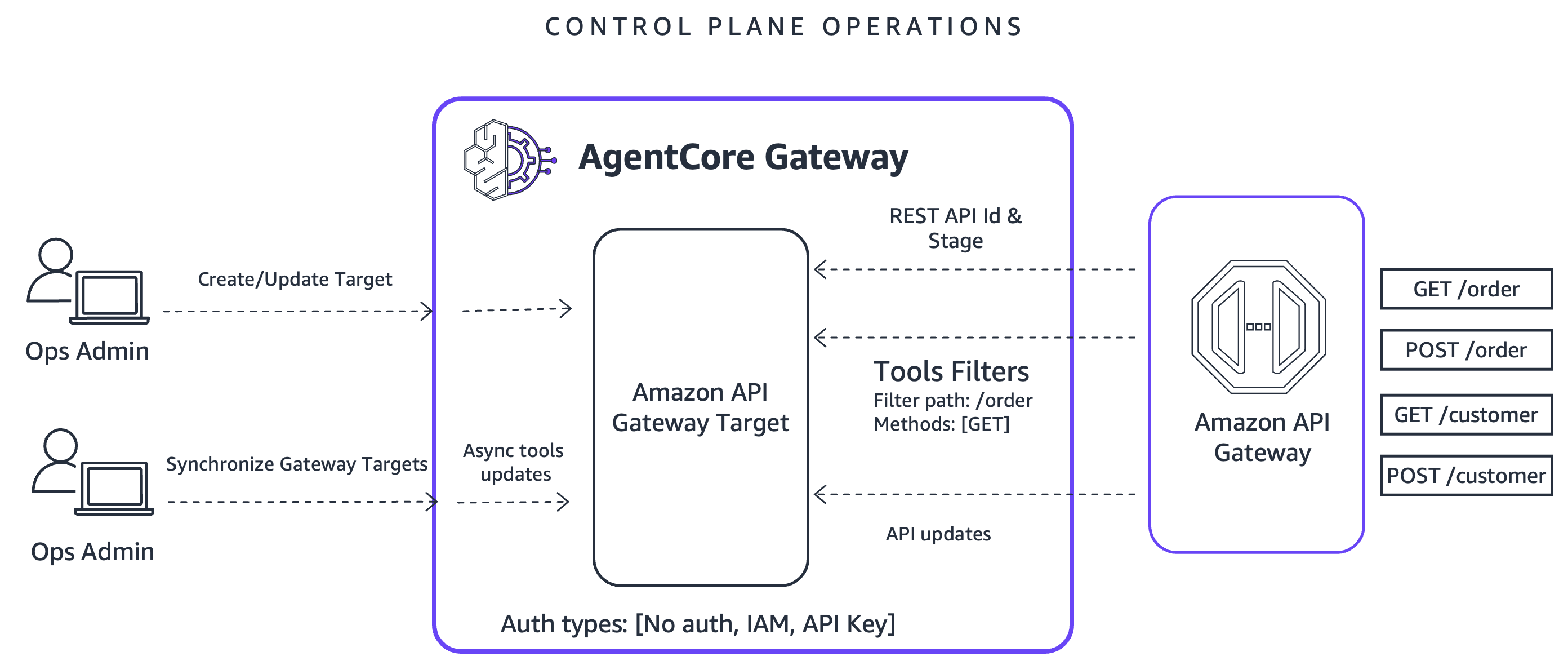
Create a target configuration
To create an API gateway target, you need to specify the following as the part of target configuration:
- toolFilters: Use this to determine what resources on the REST API will be exposed as tool on the gateway. Filters also support wildcards in the filterPath.
- toolOverrides (optional): Use this to allow users to override tool names and description. You must specify explicit paths and methods.
- restApiId: Use this to pass API Gateway ID.
Below are a few examples of target configurations:
Example 1
This exposes GET & POST /pets, GET /pets/{petId} to the gateway and overrides their tool names and descriptions.
Example 2
This will expose GET /pets but also GET /pets/{petId} or anything under /pets. Since toolOverrides is not specified, it will use the resource description from API Gateway.
Credential provider configuration
When creating a target, you also need to specify the target’s outbound authorization using a credential provider configuration. As discussed above, there are three types of credential providers:
GATEWAY_IAM_ROLE
This uses the ROLE_ARN you specified when creating the gateway. Define the credential provider configuration as follows:
API_KEY
This requires the creation of an API key credential provider with AgentCore Identity.
NO_AUTH
NO_AUTH can be configured by not specifying a credential provider configuration while creating the AgentCore Gateway target. This is not recommended.
Create an AgentCore Gateway target
Now configure your REST API as a gateway target:
Test gateway with the Strands Agent framework
Test the gateway with the Strands Agents framework to list and call the available tools from MCP server. You can also use other MCP-compatible agents built with different agentic frameworks.
You will observe the following output:
Observability
Enable application logs and tracing for your AgentCore Gateway resource. You will see detailed logs to help monitor and troubleshoot your AgentCore Gateway resource. It will include the tool calls performed by your agentic application, request parameters, responses, and errors if any.
Example logs:
Along with this, AgentCore Gateway offers detailed CloudWatch metrics including the usage metrics (TargetType, IngressAuthType, EgressAuthType, RequestsPerSession), invocation metrics (Invocations, ConcurrentExecutions, Sessions), performance metrics (Latency, Duration, TargetExecutionTime), and error rates (Throttles, SystemErrors, UserErrors).
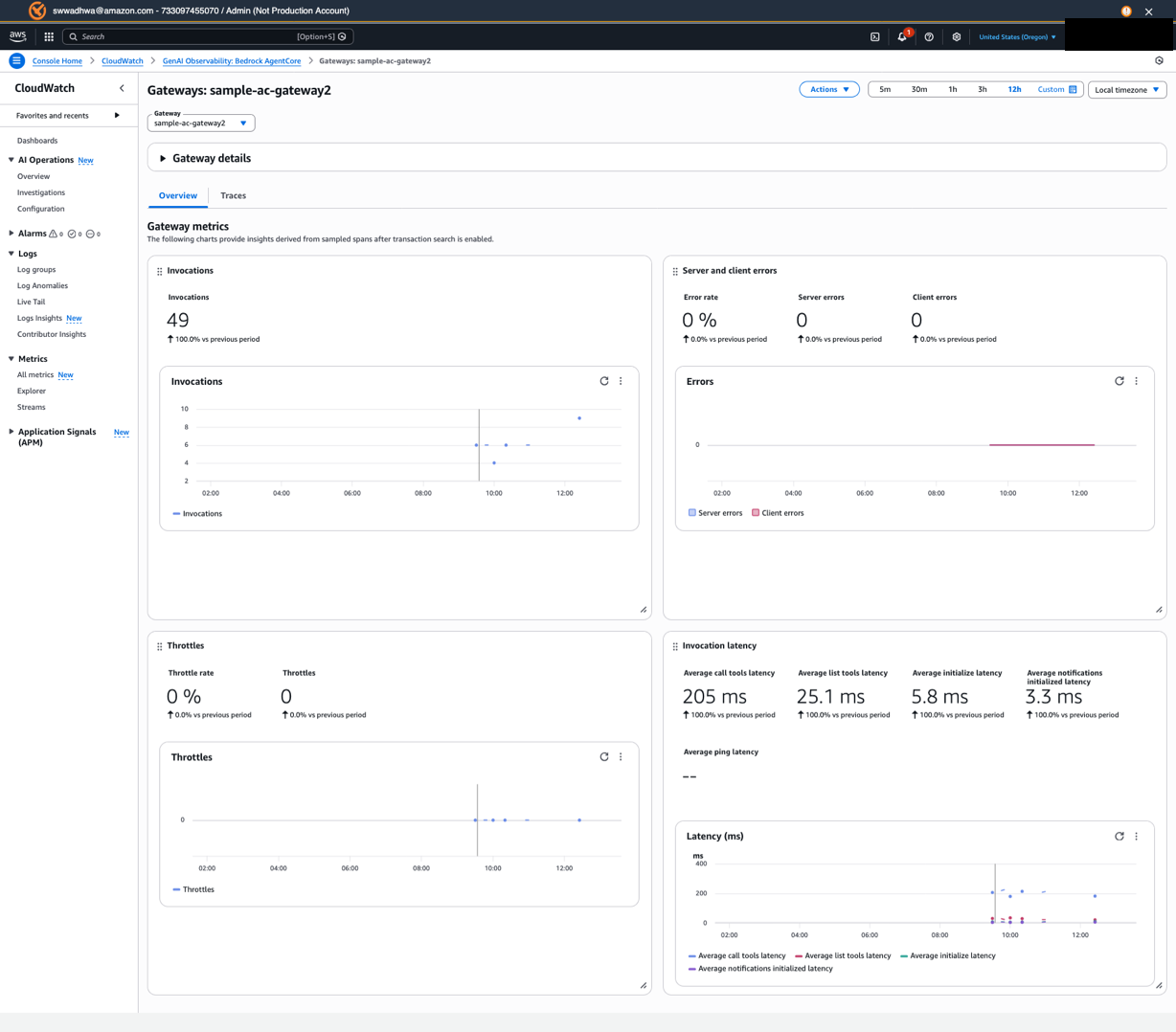
AgentCore Gateway also supports AWS X-Ray and OTEL conformant vended spans that customers can use to track invocations across different primitives that are being used.
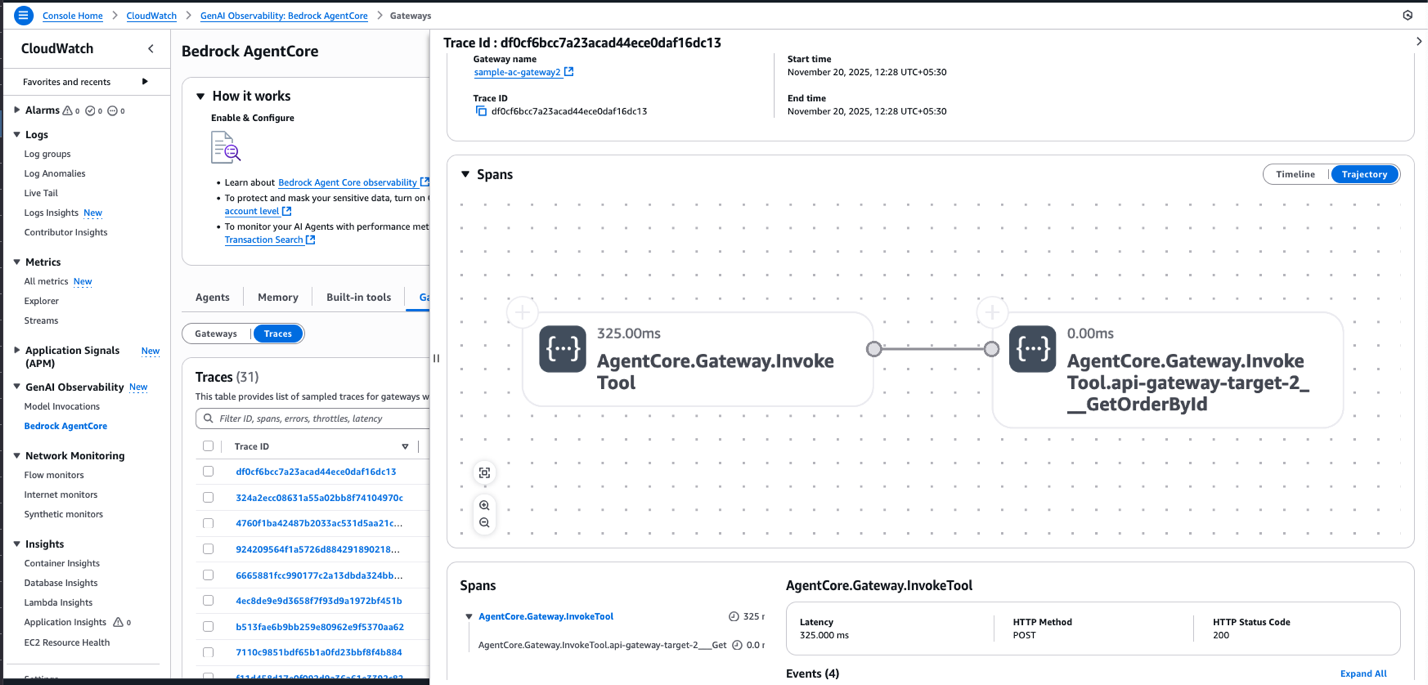
To learn more, see the AgentCore Gateway Observability documentation.
Clean up
To avoid recurring charges, make sure to delete the resources created by running the following code.
Conclusion
AgentCore Gateway now supports Amazon API Gateway as a target, exposing REST APIs as MCP-compatible endpoints. You can bring your existing API infrastructure to agentic use cases while using your current security and observability tools.
Visit our developer documentation and workshop to learn more and get started today.
About the authors
 With over 6+ years at AWS, Sparsh Wadhwa brings deep expertise in serverless, event-driven architectures, and Generative AI to his work with ISV customers in India. As a Solutions Architect, he partners with Independent Software Vendors to reimagine their products for the cloud era—from modernizing legacy systems to embedding AI capabilities that differentiate their offerings. Sparsh believes the best solutions emerge from understanding both technical possibilities and business context.
 Heeki Park is a Principal Solutions Architect at AWS. In his 9+ years at AWS, he helped enterprise customers think about how to build and operate cloud-native applications, adopt serverless and event-driven patterns, and build pragmatic generative AI applications. Heeki is an avid runner and enjoys analyzing activity data to measure improvement in cardiovascular fitness.
 Dhawal Patel is a Principal Generative AI Tech lead at AWS. He has worked with organizations ranging from large enterprises to mid-sized startups on problems related to agentic AI, deep learning, and distributed computing.